About SVNBreeze
.webp)
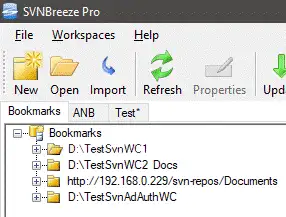
Bookmarks
Create bookmarks for your most frequently used working copies or repositories, making it easy to jump straight into the projects you work on every day. Bookmarks help streamline navigation and reduce time spent browsing folder structures.
> Free version limited to 5 bookmarks.
Workspaces
Workspaces let you bring together multiple Subversion folders, modules, or repositories into a single organised view. This is ideal for projects spread across several locations, allowing you to update, review, and manage everything at once.
> Available in the paid version.
.webp)
UI Themes
Choose from Light, Gray, or Dark themes to match your preferred working environment. Whether you like a bright interface or a low-contrast, eye-friendly layout, SVNBreeze adapts to your workflow.
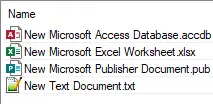
System Icons
Display native system icons for files and folders to make navigation more intuitive and familiar. This helps users quickly recognise file types and statuses at a glance.
> Available in the paid version.
.webp)
Phrases
Switch between different phrase sets to match terminology from other source control systems. This makes SVNBreeze more approachable for users transitioning from Git, Mercurial, or other tools.
Available in the paid version.
.webp)
Toolbar Icon Size
Customise the toolbar with small or large icons depending on your screen size and visual preference. Larger icons improve accessibility, while smaller icons maximise workspace.
.webp)
Customise Diff Tool
Use your preferred diff/merge tool for reviewing changes. Whether you rely on Beyond Compare, WinMerge, or another tool, SVNBreeze integrates seamlessly with your existing workflow.
.webp)
Ignore File Types
Specify file extensions, filenames, and folders to ignore during status checks. This keeps your working copy clean and prevents noise from build artefacts, logs, and temporary files.
.webp)
Pending Changes
Quickly view all pending changes for the current working copy. This gives you a clear overview of modified, added, or deleted files before committing.
.webp)
File History
View the full revision history of any file and perform actions on specific revisions. This makes it easy to track changes, investigate issues, or restore previous versions.
.webp)
Handle Conflicts
SVNBreeze automatically detects conflicts during updates and guides you through resolving each one. Clear prompts help you choose the correct version and avoid mistakes.
.webp)
New Repositories
Create new Subversion repositories with just a few clicks. Ideal for starting new projects or reorganising existing codebases.
.webp)
Branch Files & Folders
Branch individual files or entire folders with ease. This helps you isolate features, experiments, or client‑specific changes without disrupting your main codebase.
Available in the paid version.
.webp)
Merge Files & Folders
Merge changes from branches back into your main line of development using a clean, guided workflow.
Available in the paid version.
.webp)
File Properties
Set and manage Subversion file properties such as keywords, MIME types, and custom metadata.
Available in the paid version.
.webp)
Export
Export files or folders from any revision without checking out the entire repository. This is perfect for packaging releases or sharing specific components.
Available in the paid version.
.webp)
Dump Repository
Create a complete SVN dump file of any repository for backup, migration, or archival purposes.
Available in the paid version.